
Due to a small mistake, he could not log in to his account…
In the morning, before going to the office, Amol urgently needed to send ₹25,000 to his friend. He tried to log in to the bank’s Net Banking website. After entering the User ID, he entered the ATM PIN, but the message “Invalid Password” appeared on the screen. He thought the bank’s website was down. Later, after talking to customer care, he realised that the ATM PIN and Net Banking Password are two different security passwords.
Even today, many customers are unable to log in due to this confusion, repeatedly enter the wrong password or fall victim to online fraud. The Reserve Bank of India (RBI) also advises that for safe digital banking, customers need to use strong passwords, keep OTP confidential and beware of phishing.
If you have also wondered, ‘What Is a Net Banking Password?’, then this article is for you. Here we will learn in detail about what a password is, how it is generated, how it differs from an ATM PIN, how to keep it safe, and what to do if you forget it.
A net banking password is the secret password used to log in to your Internet banking account. This password is used along with the User ID or Customer ID provided by the bank. It works differently from ATM PIN, UPI PIN and transaction password. It is critical to use a strong and confidential net banking password to keep your account secure.
Key Takeaways
- A net banking password is the password used for login.
- The ATM PIN and Net Banking Password are different.
- It is necessary to use a strong and different password.
- Changing the password regularly is beneficial for security.
- OTP and password should not be shared with anyone.
- It is more secure to use separate passwords for mobile banking and net banking.
- Net Banking should be used only from the official website.
What is a Net Banking Password?
Net Banking Password is the first security wall of your internet banking account. Without entering this password, no one can login to your account.
When you go to the official website of the bank, first User ID or Customer ID is entered. Then your identity is verified by entering Login Password. This process is made more secure by security technologies like Encryption and Multi-Factor Authentication.
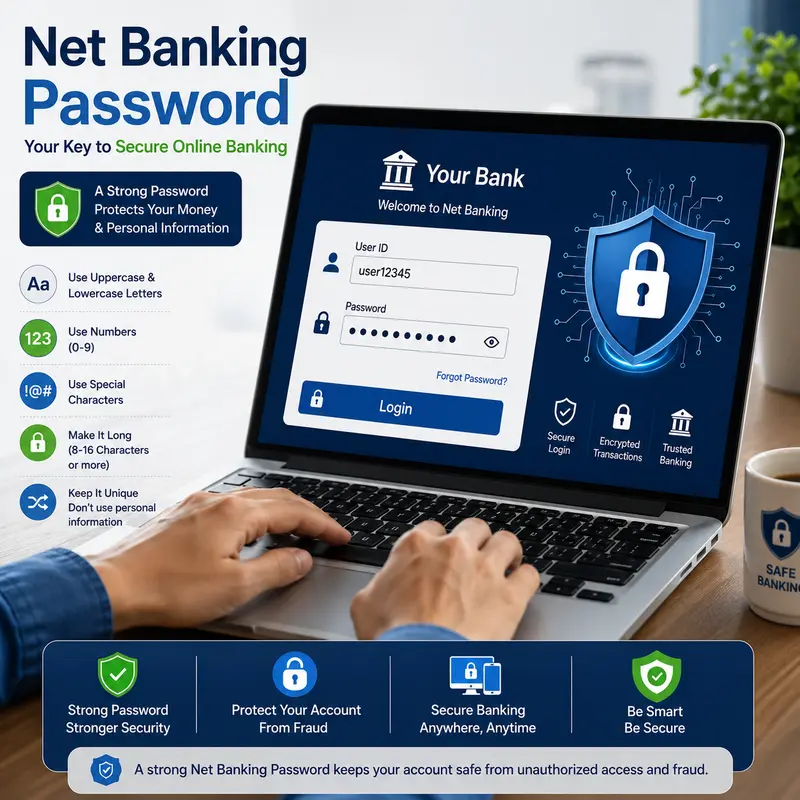
In simple terms, just like a key is needed to open the lock of a house, a Net Banking Password is required to access your Net Banking account.
If you want to know in detail what Net Banking is, its features, benefits, types and how it works, then be sure to read our article 👉 What is Net Banking? Meaning, Features, Benefits, Types & How It Works.
Why is Net Banking Password important?
Net Banking Password is not just for login but is a security factor that protects your entire bank account.
Today, through Net Banking, account balance checking, NEFT, RTGS, IMPS, Fixed Deposit, Credit Card Bill Payment, Income Tax Payment and many other financial transactions can be done online.
Therefore, if this password falls into the hands of the wrong person, there is a possibility of financial loss.
Therefore, every customer must use a strong and unique password.
7 Essential Facts About What is a Net Banking Password?
Now in this part we are going to discuss seven important facts about net banking password. These facts will be very important for every customer to create awareness about net banking.
1. Net Banking Password and ATM PIN are different
This is the most common misconception.
Many people try to login to Net Banking using ATM PIN. In reality, ATM PIN is used only for ATM machine or POS transactions, while Net Banking Password is used to login to Internet Banking.
It is also not considered safe to keep both the same.
| ATM PIN | Net Banking Password |
|---|---|
| Used for ATM transactions | Used for Net Banking login |
| Usually 4 or 6 digits | Contains letters, numbers, and special characters |
| Linked to your Debit/ATM Card | Linked to your Internet Banking account |
2. What is the difference between Login Password and Transaction Password?
Some banks use two different passwords.
You log in to Net Banking using Login Password.
You use Transaction Password to transfer money, add beneficiary or complete other financial transactions.
This makes it difficult to transact without Transaction Password even if someone knows Login Password. Some banks use OTP instead of Transaction Password.
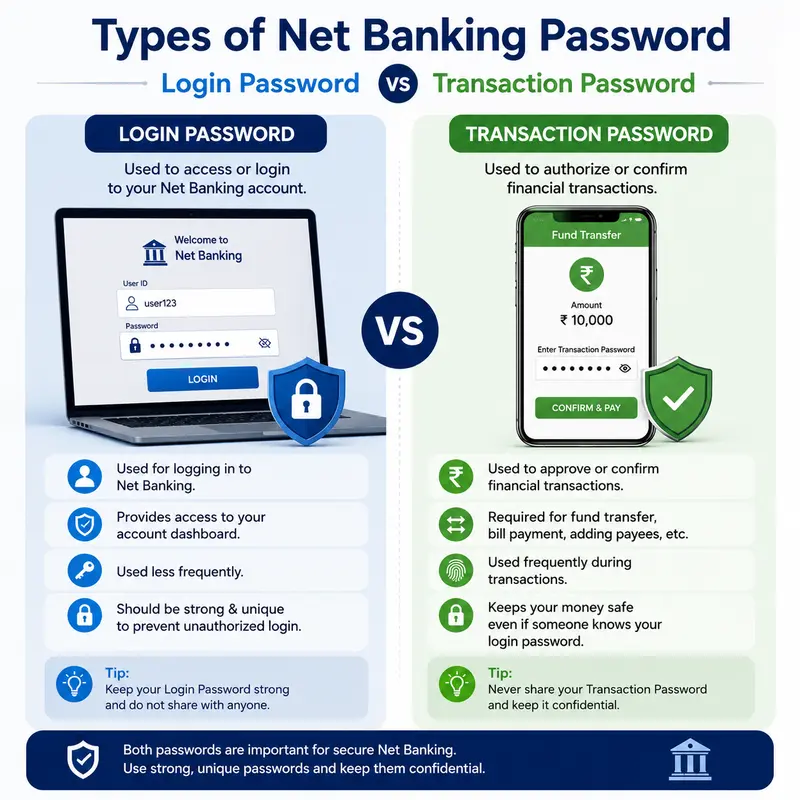
| Login Password | Transaction Password |
|---|---|
| Used for login | Used to authorize transactions |
| First layer of security | Second layer of security |
| Required every time you log in | Required while making financial transactions |
3. What should be a Strong Net Banking Password?
Creating a strong password is very important in terms of cyber security.
A good password:
- Should be at least 8–12 characters long.
- Should use uppercase and lowercase English letters.
- Should include numbers.
- Should use special symbols like @, #, !, %.
- Avoid using name, date of birth or mobile number.
Example:
- ❌ Abhi123
- ❌ Pune1995
- ✅ Abhi@Bank#2026
Many banks advise customers to change their passwords periodically.
4. What to do if you forget your Net Banking Password?
Forgetting your password is a common thing. So there is no need to panic. Almost all banks provide the Forgot Password or Reset Password facility.
First of all, go to the bank’s official Net Banking website and select the Forgot Password option. Then your identity is verified through Customer ID, registered mobile number, debit card details or OTP. After the verification is complete, you can create a new Login Password.
If the online password is not reset, you can get a new password by visiting the nearest bank branch or contacting Customer Care. For security reasons, do not get your password reset from any stranger.
Things to remember while resetting your password
- Use only the official bank website.
- Do not share the OTP with anyone.
- Do not keep the new password the same as the old password.
- After resetting, log in once and check all the information.
5. What habits are necessary to keep Net Banking Password secure?
As important as creating a strong password is, it is also important to keep it secure. Many types of online fraud are caused by the carelessness of the customers.
Never write down passwords on paper or save them in plain text in the Notes App of the mobile. Avoid using Net Banking on public computers, cyber cafes or other people’s laptops if possible.
Changing passwords regularly and using a different password for each account greatly reduces the risk of cyber attacks.
Do’s and Don’ts for a secure password
| Do’s | Don’ts |
|---|---|
| Use a strong password | Don’t use your date of birth as a password |
| Change your password regularly | Don’t share your password with anyone |
| Keep your OTP confidential | Don’t save your password in the browser |
| Use only the bank’s official website | Don’t click on phishing or suspicious links |
6. Should Mobile Banking and Net Banking passwords be the same?
Today, many customers use both Mobile Banking and Net Banking services. Therefore, many people think that “it will be easier to remember if you keep the same password for both places”.
But this is not the right decision in terms of cyber security. If the password of one account is stolen, the other account can also be at risk.
Instead, it is safer to use separate and strong passwords for Mobile Banking and Net Banking. Also, if possible, facilities like Biometric Login and Two-Factor Authentication should be used.
Mobile Banking vs Net Banking
| Mobile Banking | Net Banking |
|---|---|
| Accessed through a mobile app | Accessed through a web browser |
| Best for quick daily transactions | Best for complete banking services |
| Supports UPI, bill payments, and mobile recharges | Supports NEFT, RTGS, FD, tax payments, and more |
| Uses App Password, MPIN, or Biometric authentication | Uses Login Password (and often a Transaction Password for transactions) |
If you want to know in detail what Mobile Banking is, its features, benefits and how it works, then be sure to read our article 👉 What is Mobile Banking? Meaning, Features, Benefits & How It Works Perfectly.
7. Most Common Mistakes About Net Banking Password
Many customers unknowingly make mistakes that can put their accounts at risk.
- 1. Using the same password everywhere
- 2. Saving Password in Browser
- 3. Sharing OTP
- 4. Logging in to Fake Website
10 Important Tips to Remember While Creating Net Banking Password
The following are the important tips for creating a strong password.
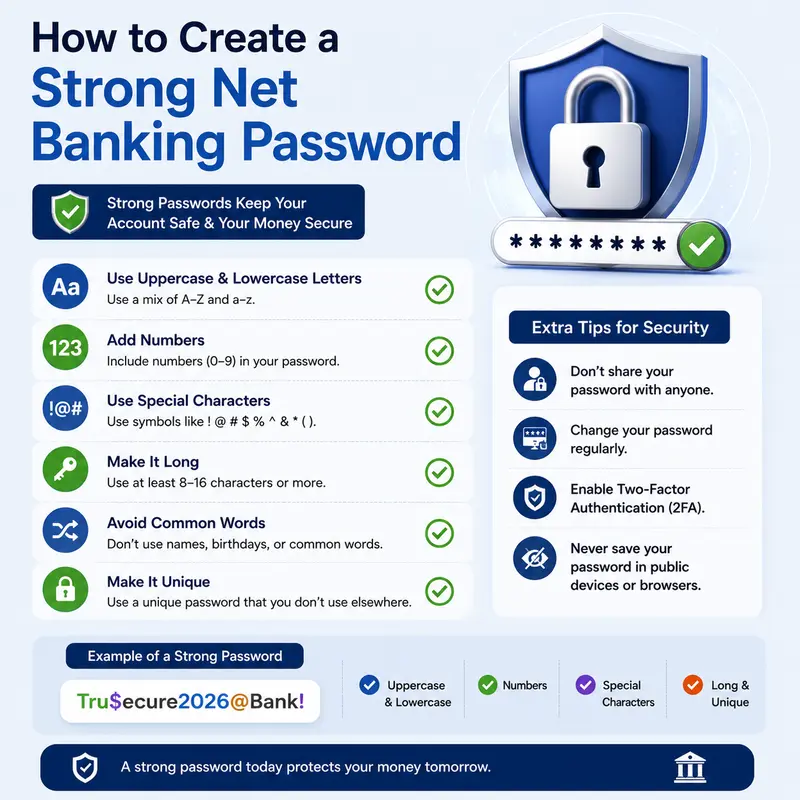
- Keep a password of at least 8 to 12 characters.
- Use uppercase and lowercase English letters.
- Include numbers.
- Use special symbols (@, #, $, %).
- Avoid name, date of birth or mobile number.
- Change your password every 3–6 months.
- Do not save your password in the browser.
- Avoid using Net Banking on public Wi-Fi.
- Always log out after logging in.
- Do not click on links in suspicious emails or SMS.
Security Awareness for Banking Customers While Using Net Banking
Although digital banking has made financial transactions easier, the incidence of cyber crimes is also increasing. Therefore, it is necessary for every Banking Customer to follow the rules of digital security.
It is the responsibility of every customer to maintain the confidentiality of Password, OTP and personal information, especially while using Mobile Banking and Net Banking. Proper awareness can prevent fraud and make online transactions safer.
Expert Tips
- If you use a password manager, choose a trusted service.
- Always enable Two-Factor Authentication if available.
- Check SMS or Email Alerts after each login.
- Contact your bank immediately if you see any suspicious transactions.
- Check your account statement regularly.
Myths vs Facts about Net Banking Password
There are many misconceptions about digital banking among consumers today. These misconceptions often lead to security risks.
| Myth | Fact |
|---|---|
| ATM PIN and Net Banking Password are the same. | They are completely different and serve different purposes. |
| Once you create a password, you never need to change it. | Changing your password regularly improves security. |
| Saving your password in the browser is always safe. | It can be risky, especially on shared or stolen devices. |
| Bank employees may ask for your password. | Banks never ask for your Password, OTP, or PIN. |
| Using the same password for Mobile Banking and Net Banking is fine. | Using different passwords for each service is much more secure. |
Common mistakes made while using Net Banking Password
Many times, small mistakes of the customers are more dangerous than hacking.
1. Keeping a simple password
Passwords like 123456, password, date of birth or mobile number are easily recognizable. So, you should not keep a very simple password.
2. Using the same password for all accounts
If the data of one website is leaked, other accounts are also at risk. It is possible that the customer needs to set different passwords for his different accounts. If there is a single password, all your accounts can be hacked.
3. Clicking on suspicious links
If you use a login link in a fake SMS or email, your password can be stolen. If you receive any links through SMS or email or WhatsApp or other social media, do not click on that fake link because your password and other information can be stolen after clicking on that link.
4. Using public Wi-Fi
If possible, avoid using Net Banking on public networks like Airport, Café or Railway Station. Because when using public WiFi, your account information can reach hackers.
5. Not Logging Out After Login
It is very important to log out, especially on shared computers. But one thing to remember is that when you are logging in to internet banking, you should always log out of your internet banking after completing the transaction, even if the computer is your own.
Golden Rules to Keep Net Banking Password Secure
- Use a different password for each bank account.
- Use letters, numbers and special characters in the password.
- Never share OTP, CVV, PIN and password.
- Change the password regularly.
- Login only from the official bank website.
- Check https:// and the correct domain in the browser address bar.
- Report any suspicious transactions to the bank immediately.
Digital Banking in India – Key Statistics (2026)
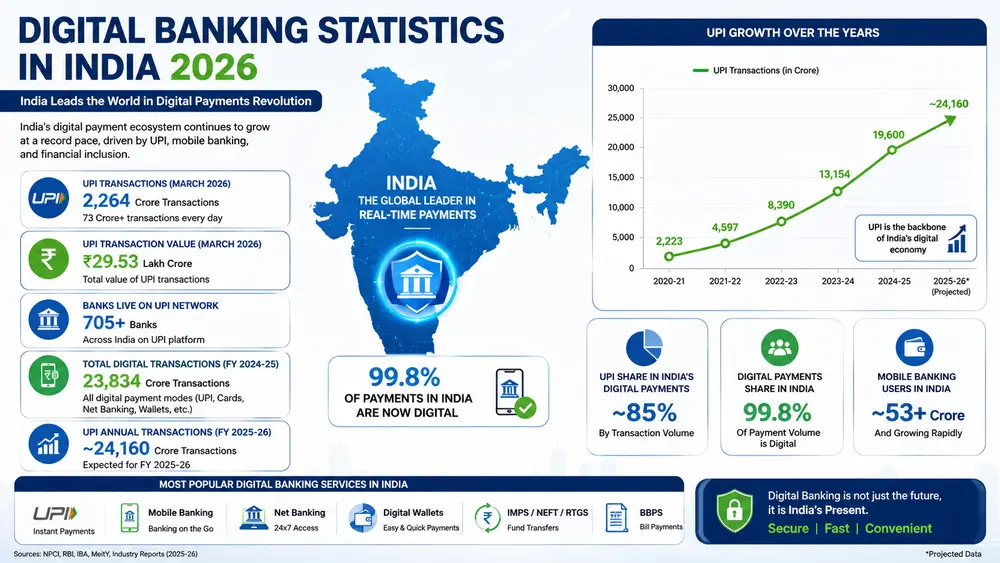
Digital banking usage in India is growing at a record pace. Due to this, the importance of Net Banking Password, OTP and Banking Security has also increased more than ever.
Key Statistics in 2026
- 📊 24,161.69 crore transactions were recorded through UPI in FY 2025–26. (Source: Press Information Bureau)
- 💰 The total value of these transactions was ₹314 lakh crore.
- 🏦 As of March 2026, 703 banks were connected to the UPI network.
- 📱 UPI is used in about 85% of the total digital payment transactions in India.
- 🌍 About 49% of the world’s Real-Time Digital Payments are made through UPI in India.
- ⚡ As per NPCI data, In May 2026, 2,320.19 crore UPI transactions were made in a month, with a total value of ₹29.90 lakh crore.
Frequently Asked Questions (FAQ) : What is a Net Banking Password?
1. What is Net Banking Password?
Net Banking Password is a secret security password used to login to Internet Banking.
2. Are ATM PIN and Net Banking Password the same?
No. ATM PIN is used for ATM or POS transactions, while Net Banking Password is used for online login.
3. What to do if you forget your Net Banking Password?
You can create a new password using the Forgot Password option on the bank’s official website through OTP or other verification.
4. How often should you change your Net Banking Password?
It is considered a good habit to change your password every 3 to 6 months for security reasons.
5. Should you use the same password for Mobile Banking and Net Banking?
No. Using a different password for both services increases security.
6. How to create a strong password?
A password of at least 8–12 characters should be created using uppercase and lowercase letters, numbers and special characters.
7. Does the bank ask for the password or OTP over the phone?
No. No bank or its authorized employee asks for Password, PIN or OTP.
Conclusion
What is a Net Banking Password? The answer to this question is not limited to just “the password used for login”. It is the foundation of your digital banking security. Strong passwords, proper cybersecurity habits, and using authorised banking platforms can greatly reduce the risk of financial fraud. Awareness is the best way to use Mobile Banking and Net Banking safely in today’s digital age. Is your Net Banking Password still safe and strong?
Author’s Note: This article is published for educational and awareness purposes only. The information provided is based on official banking guidelines and trusted government sources available at the time of writing. Banking policies, security features, and digital banking procedures may change over time. Always verify the latest information through your bank’s official website or customer support before making any financial decisions. Never share your net banking password, OTP, PIN, or other confidential banking credentials with anyone.
References
- Reserve Bank of India (RBI) – Digital Banking & Customer Security Guidelines
- National Payments Corporation of India (NPCI) – UPI Statistics and Digital Payment Reports
- Press Information Bureau (PIB), Government of India – Digital Payments & UPI Reports
- Digital India, Government of India – Digital Financial Services
- Ministry of Electronics and Information Technology (MeitY) – Digital Payments Initiatives

Hello! I’m Abhijeet Bendale, founder of MoneyPedia (Your Trusted Banking Guide). With 8 years of experience in the education field, I aim to simplify banking and personal finance topics for everyday readers through easy-to-understand guides and tutorials.
At MoneyPedia, I share informative content on UPI, digital payments, net banking, ATM and debit cards, mobile banking, and other essential banking topics to help users make smarter financial decisions with confidence.