
Key Takeaways
- Net Banking is the facility to use online banking services through the internet.
- It is also known as Internet Banking, Online Banking and E-Banking.
- Net banking allows you to do fund transfer, bill payment, FD booking and account management from the comfort of your home.
- NEFT, RTGS and IMPS are the major money transfer methods in net banking.
- Net banking saves our time because it is available 24×7, which saves time and effort.
- Online banking encourages paperless and eco-friendly banking.
- Using strong password, OTP protection and official banking apps is very important for security.
- It is necessary to be careful of phishing links, fake KYC calls and QR code scams.
- There is a difference between net banking and UPI — UPI is used for quick payments while net banking is used for complete banking services.
- In today’s digital India, net banking has become an important tool for daily financial transactions.
Introduction
In today’s digital age, people complete most of their financial transactions from their mobile or laptop rather than going to the bank. Paying electricity bills, transferring money, paying EMIs, opening FDs or checking account balances — all of these can now be done online in a matter of minutes. This is called Net Banking or Internet Banking.
The use of UPI, digital payments and online banking is growing rapidly in India. Therefore, “What is Net Banking?” is a question that many new internet users, students, senior citizens and people starting online banking ask.
Net banking is the facility of using banking services with the help of the internet through the bank’s website or official mobile app. This allows customers to carry out financial transactions 24×7 without visiting the bank branch.
In this article, we will learn detailed information about net banking meaning, features of net banking, benefits, types, registration process, safety tips, NEFT, RTGS, IMPS, fraud awareness and practical usage.
What is Net Banking?
Net Banking is the online facility to use bank services through the Internet. Net Banking is also called Internet Banking, Online Banking or E-Banking.
Through this facility, customers can do the following tasks from home:
Such as
- Checking account balance
- Transferring funds
- Making bill payments
- Booking FD/RD
- Credit card payment
- Loan EMI payment
- Requesting a cheque book
- Downloading transaction history
Earlier, even for small tasks, one had to go to the bank. But now, due to net banking, transactions can be done in a few minutes from a mobile phone or computer. And that too, from home, anywhere and at any time.
What is Net Banking in Simple Words?
In simple words:
Net banking is the facility of conducting online banking using the internet.
For example:
- Sending money to a friend
- Paying electricity bill
- Recharging mobile
- Checking account balance
If you do all these tasks from your mobile without going to the bank, then you are using net banking.
How Does Net Banking Work?
Net banking works on a secure digital system. Each customer is given a unique customer ID and password. Through which the customer logs in to the bank’s secure portal. And runs net banking.
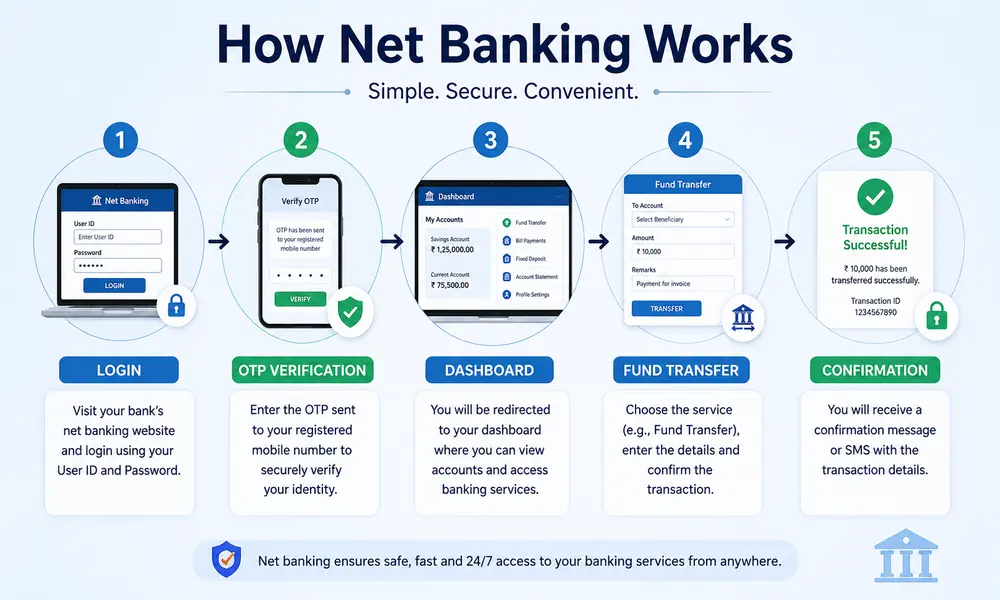
The net banking process is generally as follows:
- Customer registers for net banking.
- Bank gives customer ID and password.
- Customer logs in to the official website or app.
- Account details appear on the dashboard.
- Customer can use services like fund transfer, bill payment, FD booking etc.
- OTP or 2-factor authentication is used to verify transactions.
Many banks now also offer advanced security features like fingerprint login, face recognition and real-time alerts. These features do not cause fraud. Due to this, net banking has become much more trustworthy now.
Features of Net Banking
Net banking has a big role in its popularity among the public due to its facilities. The following features of net banking are considered the most useful:
1. 24×7 Banking Access
Net banking facility is available 24 hours a day, i.e. whether it is a bank holiday or night time, the customer can use the account at any time.
2. Instant Fund Transfer
Instant Fund Transfer means that you can transfer money immediately. Money can be transferred online with the help of NEFT, RTGS and IMPS.
3. Online Bill Payment
Net banking allows you to easily pay all types of bills like Electricity bill, water bill, DTH recharge, FASTag recharge and credit card bills.
4. Account Management
Net banking allows you to do many of your tasks online very easily from home. Such as
- Passbook can be downloaded
- Mini statement can be viewed
- Address can be updated
- Mobile number can be updated
- Debit card control facility is available
- Many such tasks can be done online.
5. FD/RD Opening
With net banking, you will not need to go to the bank to open Fixed Deposit and Recurring Deposit online because in net banking, you can do FD or RD Opening online.
6. Loan & EMI Services
With net banking, you can also enjoy loan related facilities. Loan application, EMI payment and loan statement can be done online. Therefore, this is also an important feature of net banking.
7. Investment Services
With net banking or online banking, you also get all the services related to investment in online format, that is, some banks also offer mutual funds, insurance and investment products.
8. Secure Banking
Net banking or online banking is secure banking because the bank provides facilities like Encryption, OTP verification and two-factor authentication to keep net banking running smoothly and securely, so transactions remain safe.
Types of Net Banking
There are various types of online banking services available in net banking.
1. NEFT (National Electronic Funds Transfer)
NEFT is an online fund transfer system through which money can be sent from one bank account to another.
Features:
- All transactions in NEFT are secure.
- NEFT charges less.
- NEFT is useful for both small and large transactions.
2. RTGS (Real Time Gross Settlement)
Large amount transactions are done in real-time through RTGS.
Features:
- RTGS is suitable for high-value transactions.
- Instant settlement is done through RTGS.
- Like NEFT, RTGS is also safe and fast.
3. IMPS (Immediate Payment Service)
IMPS is a 24×7 instant money transfer service.
Features:
- You can transfer money instantly through IMPS.
- IMPS facility is available even on weekends and holidays.
- IMPS is used in mobile banking and UPI systems.
To understand digital banking better, don’t miss our complete guide on What is Mobile Banking? Meaning, Features, Benefits & How It Works.
4. ECS (Electronic Clearing System)
ECS is used for recurring payments.
Example:
- ECS is used for EMI payment.
- ECS is also used for insurance premium.
- ECS is also a good option for SIP investment.
- ECS is also used for utility bill payment.
5. Debit & Credit Card Banking
Debit and credit card banking is also a type of net banking or online banking. In this, the customer uses debit/credit cards for online shopping, ATM withdrawal and merchant payments.
Uses of Net Banking in Daily Life
Today, the use of net banking is not limited to just transferring money.
In daily life, it is used for the following things such as Electricity bill payment, Mobile recharge, School/college fees payment, Online shopping, Mutual fund SIP, FASTag recharge, Credit card payment, Train/flight ticket booking, Loan EMI payment, Insurance premium payment. Net banking is used for various reasons. This saves both time and effort.
How to Use Net Banking?
If you are using net banking for the first time, then understand the following process:
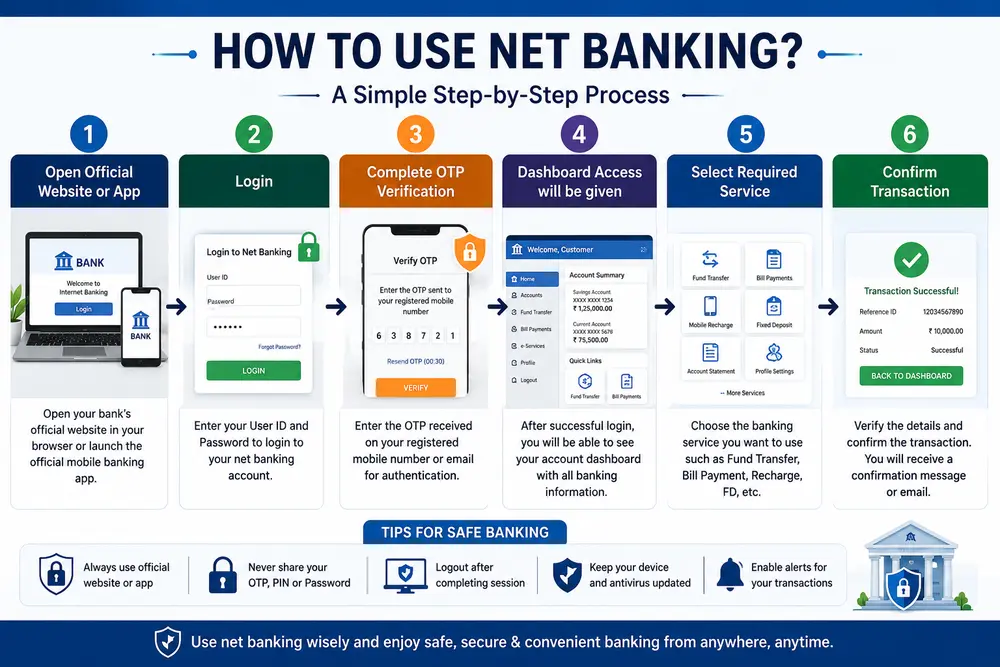
- Step 1: Open Official Website or App
- Step 2: Login
- Step 3: Complete OTP Verification.
- Step 4: Dashboard Access will be given.
- Step 5: Select Required Service
- Step 6: Confirm Transaction.
How to Register for Net Banking Online?
Today most banks offer online self-registration facility. Now let us see the steps on how to start net banking online.
Registration Process:
- visit the official website of the bank.
- Click on “New User Registration” or “Register Here”.
- Enter Account number.
- Verify Registered mobile number.
- Enter Debit card details.
- Complete OTP verification.
- Create Username and strong password.
- Login and start net banking.
For example, through the SBI Internet Banking portal, customers can use various banking services by registering online.
How to Activate Net Banking Offline?
Some customers prefer to activate net banking from the branch. Now let us see the steps on how to activate net banking offline.
Offline Activation Steps:
- Go to the nearest bank branch.
- Fill the net banking registration form.
- Submit Aadhaar card, passbook and ID proof.
- After bank verification is complete, you will get customer ID and password.
- Activate the account by logging in to the official portal.
How to Transfer Money Using Net Banking?
With the help of net banking, money can be transferred in a few minutes. Now let us see the step-by-step process of how to transfer this money.
Step-by-Step Process:
- Login to your net banking account.
- Go to the “Fund Transfer” section.
- Select Transfer mode.
- Add Beneficiary.
- Enter IFSC code and account number.
- Enter Transfer amount.
- Verify OTP.
- Complete the transaction.
Benefits of Net Banking
Followings are the benefits of Net Banking.
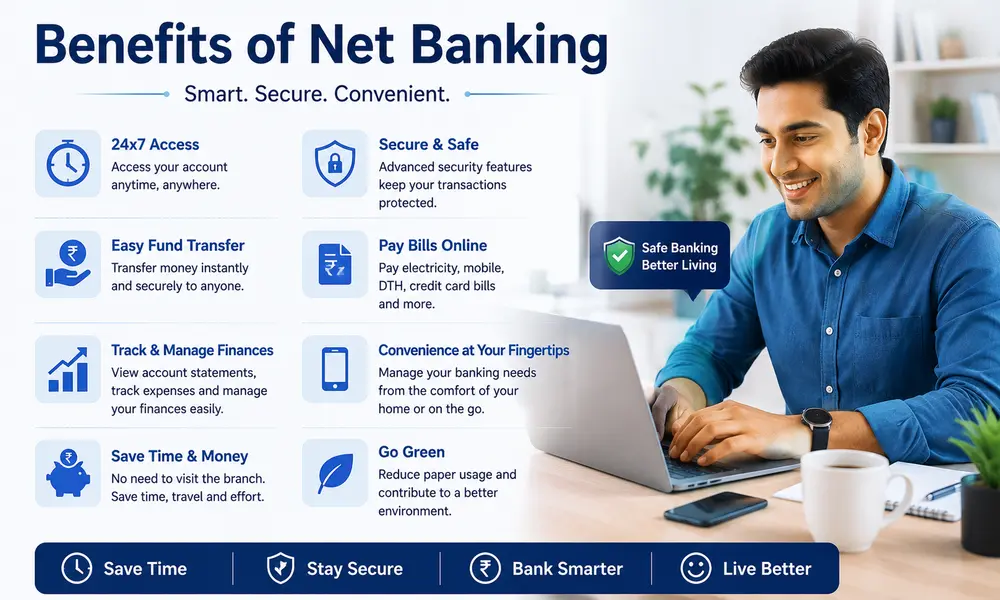
- Convenience means no need to go to the bank.
- Time Saving means long queues can be avoided.
- 24×7 Access means banking services can be used at any time.
- Quick Transactions means online fund transfer is completed in a few seconds.
- Paperless Banking means Passbook printing and paper forms are reduced.
- Better Financial Tracking means transaction history can be easily tracked.
- Secure Banking means security is increased due to advanced encryption and OTP.
- Cost Effective means many online services are available at low charges.
Disadvantages of Net Banking
Although net banking is useful, there are some limitations as well.
- Internet Dependency means the service cannot be used if there is no Internet.
- Cyber Fraud Risk means there may be a risk of phishing and hacking.
- Technical Issues means sometimes the server may be down or transaction failure.
- Difficult to Beginners means sometimes senior citizens or new users may find it difficult to use.
- No Cash Deposit Facility means you have to use a branch or ATM for cash deposit.
NEFT vs RTGS vs IMPS
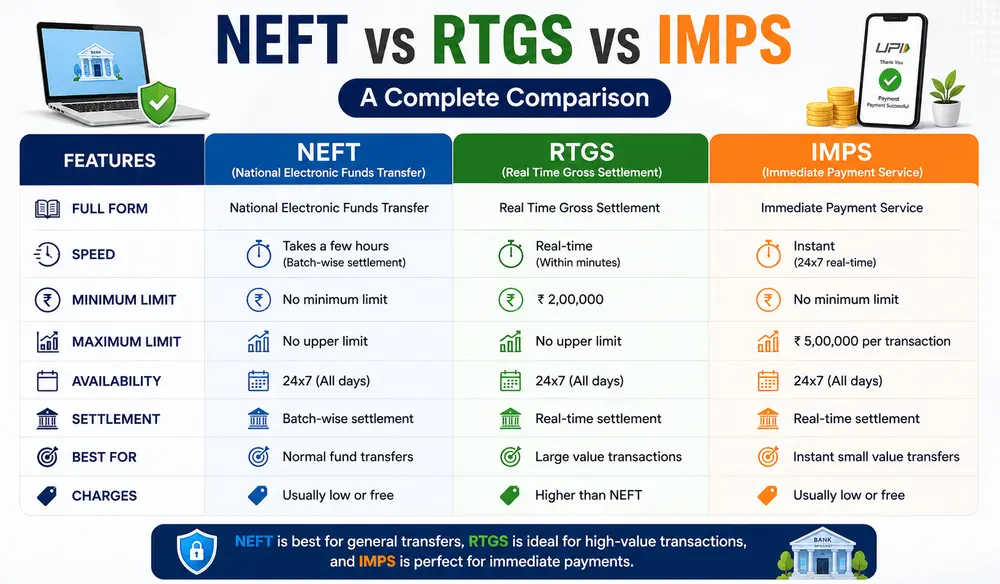
| Feature | NEFT | RTGS | IMPS |
| Speed | Batch-based | Real-time | Instant |
| Availability | Banking hours | Banking hours | 24×7 |
| Best For | Regular transfers | Large transfers | Urgent transfers |
| Minimum Limit | No minimum limit | ₹2 lakh | Bank dependent |
| Usage | Daily payments | High-value payments | Instant retail payments |
Net Banking vs Mobile Banking
| Feature | Net Banking | Mobile Banking |
| Platform | Website | Mobile App |
| Device | Computer/Laptop | Smartphone |
| Accessibility | Browser based | App based |
| User Experience | Detailed dashboard | Quick access |
| Best Use | Large transactions | Daily quick banking |
Net Banking vs UPI
| Feature | Net Banking | UPI |
| Transfer Method | Bank portal | UPI app |
| Speed | Fast | Instant |
| Requirement | Login credentials | UPI PIN |
| Best Use | Banking services | Quick payments |
| Features | Full banking access | Payment focused |
UPI, IMPS and many other digital payment systems in India are developed and managed by the NPCI Official Website.
Is Net Banking Safe?
Yes, net banking is safe if used properly.
Banks use the following security systems:
- Encryption technology is used.
- OTP verification is done.
- Two-factor authentication is done.
- Real-time alerts are available.
- Secure login protocols are available.
- Biometric authentication is available.
- However, users also need to be careful.
As per RBI guidelines, customers are required to keep OTP and banking credentials safe.
Common Net Banking Frauds
Nowadays, online banking fraud is increasing at a large scale.
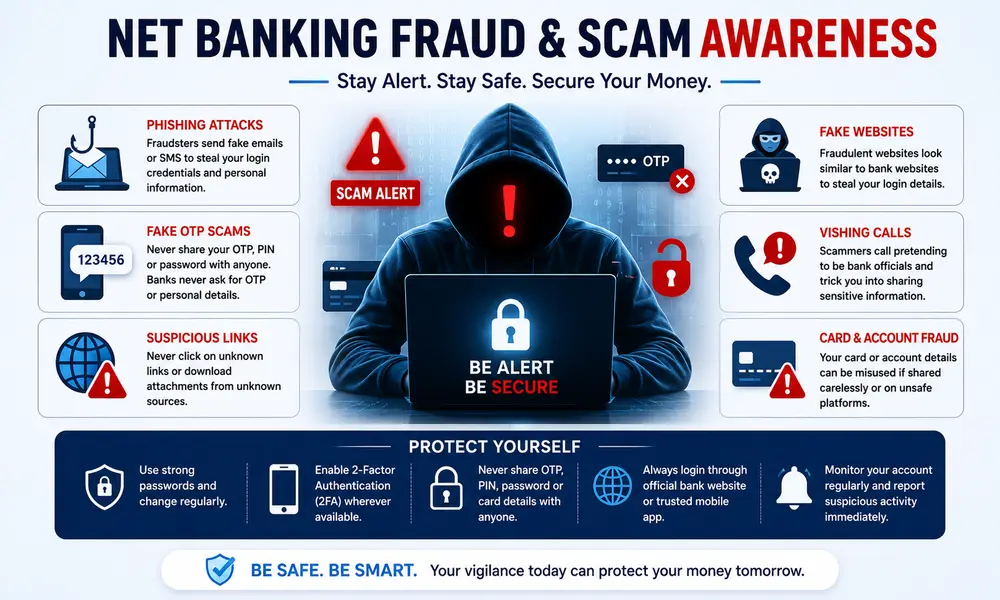
- OTP Scam means that fraudsters try to gain account access by asking for OTP.
- Fake KYC Update Scam means that fake messages like “Your KYC expired” are sent.
- Phishing Websites means that fake websites like bank websites are created.
- Screen Sharing Scam means that accounts are hacked by installing remote access apps.
- Fake Customer Care Numbers means that fake support numbers are posted on Google.
- QR Code Fraud means that money is stolen by scanning QR codes.
If you experience online banking fraud, immediately file a complaint on the National Cyber Crime Portal.
Safety Tips for Using Net Banking
- Use Strong Passwords means create a strong password and change it regularly.
- Never Share OTP means do not share OTP, CVV and passwords with anyone.
- Avoid Public WiFi means avoid banking on Cyber café or public WiFi.
- Use Official Website means always use the official bank website or app.
- Enable Two-Factor Authentication means 2FA increases account security.
- Install Antivirus Software means use updated antivirus software.
- Monitor Transactions Regularly Check suspicious transactions immediately.
- Logout After Banking Log out of the account after completing the work.
Common Net Banking Problems and Solutions
- If there is a network issue when the problem OTP Not Received occurs, wait for some time.
- If the problem Transaction Failed occurs, if the amount is deducted, contact bank support.
- If there is a problem Forgot Password, reset it using the “Forgot Password” option.
- If there is a problem Server Down, banking servers can slow down during peak hours.
- If there is a problem Beneficiary Not Added, check if the IFSC code and account details are correct.
Net Banking Charges and Transaction Limits
Some banks may charge nominal charges on online transactions.
Example:
- RTGS charges
- IMPS fees
- Debit card service charges
Also, the transfer limit of each bank is different.
Who Can Use Net Banking?
The following people can use net banking:
- Students can also use net banking for their school or college related work
- Salaried employees can also use net banking
- Business owners can also easily use net banking
- Senior citizens can also use net banking for their various things.
- Online shoppers can also use net banking easily for those who shop online.
- Investors can also use net banking to make their investments
- Anyone who has a bank account and internet access can use net banking.
Conclusion
Net banking has made banking services faster, safer and easier. From checking account balance to fund transfer, bill payments, investments and loan services, everything can now be done online.
In today’s digital age, internet banking is not just a convenience but has become an important part of daily financial life. However, it is important to be careful of cyber fraud and phishing scams while using online banking.
Using net banking safely with proper security measures can save you time, effort and money.
FAQs : What is Net Banking
What is net banking in simple words?
Net banking means the facility of using online banking services through the internet.
Is net banking free?
Most basic net banking services are free. Charges may apply for some transactions.
Can I use net banking on mobile?
Yes, net banking can be used through mobile banking apps and browsers.
Is net banking safe for money transfer?
Yes, net banking is considered safe due to OTP and encryption.
What is the distinguish between UPI and net banking?
UPI is used for quick payments, while net banking offers complete banking services.
Which banks provide net banking in India?
Almost all major banks in India offer net banking facilities.
Can I activate net banking without visiting a branch?
Yes, many banks offer online self-registration facilities.
What is the next step if I forget my net banking password?
You can reset your password using the option of Forgot Password.
Disclaimer
This information is provided for educational and informational purposes only. Net banking related rules, charges, transaction limits and banking services may vary from bank to bank. Please consult the official website of the respective bank or a financial advisor before making any financial decision.
References
- Reserve Bank of India (RBI)
- SBI Internet Banking Portal
- HDFC Bank Net Banking Services
- ICICI Bank Online Banking Guide
- NPCI Official Website
- Bajaj Finserv Banking Articles
- RBL Bank Digital Banking Guide
- Indian Institute of Banking and Finance (IIBF) – Digital Banking
- K. C. Shekhar – Banking Theory and Practice
- IIBF – Principles and Practices of Banking
- Dr. Gurusamy S. – E-Banking and Financial Services

Hello! I’m Abhijeet Bendale, founder of MoneyPedia (Your Trusted Banking Guide). With 8 years of experience in the education field, I aim to simplify banking and personal finance topics for everyday readers through easy-to-understand guides and tutorials.
At MoneyPedia, I share informative content on UPI, digital payments, net banking, ATM and debit cards, mobile banking, and other essential banking topics to help users make smarter financial decisions with confidence.